Restore Old Photos / Restore childhood photos
Restore Old Childhood Photos Online: Bring Back Baby Pictures and School Portraits
Bring your baby pictures and school portraits back to their true colors in about a minute, with every young face kept as it was.
An old childhood photo is restored online by uploading a scan and letting AI repair fading, scratches, and blur while the child’s face stays the same. Childhood photo restoration is the digital repair of age damage on baby pictures, school portraits, and family snapshots, from 1950s black-and-white prints to 1990s color photos and Polaroids. A scan, upload, repair, and download fix faded colors, spots, torn edges, and blurry young faces, and the before-and-after result is a clearer image to save and share. Restore Old Photos repairs fading, scratches, tears, and creases in one pass, with a faithful or bolder version and optional colorization at no extra credit. Restore old childhood photos online to bring that revived photo back into the family album.
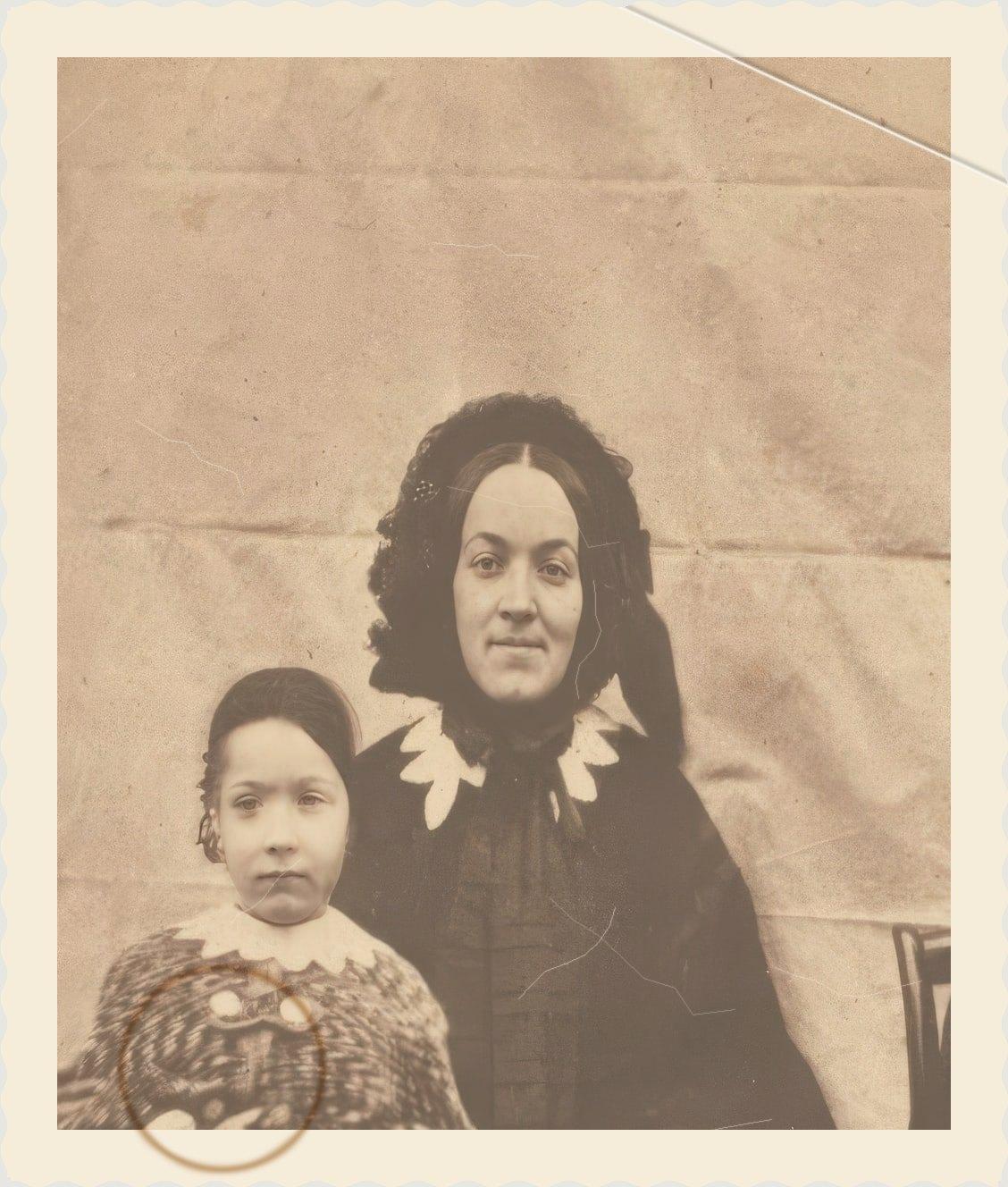
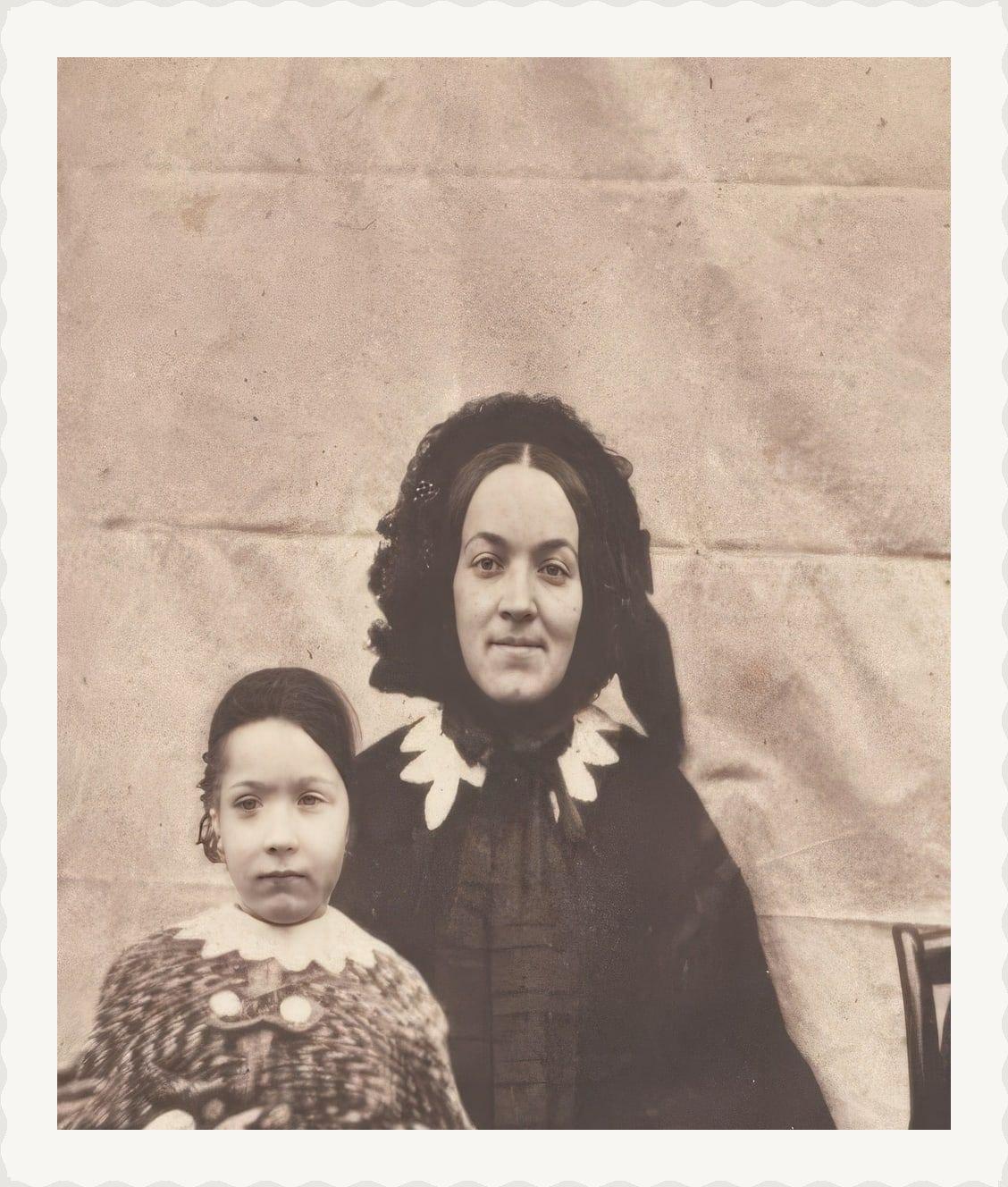
Restored Childhood Photos Before and After
Drag the handle to compare. This is an illustration, not a result: we added a snapshot border, then fading, a crease and a coffee ring digitally to an 1854 public-domain photo of a mother and child, so you can see what the repair aims for. With your own photo, every result is checked against your original before you see it.
The restored childhood photos before and after below are illustrations, each photo shown with damage added digitally beside the clean photo. Restored versions lose fading, scratches, dust, tears, and creases while faces, expressions, clothing, and period character stay the same.
Restore my photoRestore Old Childhood Photos Online With AI
Restore Old Photos restores old childhood photos online with AI, repairing fading, scratches, stains, tears, creases, and blur while keeping the child’s face, expression, clothes, and framing. The Restore tool is told never to age, beautify, or redraw the child’s face, and a version that changes it is never shown.
- per photo
- ≈ 1 min
- per photo
- per photo
- 1 credit
- per photo
- then your upload is deleted
- 24 h
- then your upload is deleted
Types of Old Childhood Photos
Old childhood photos come in five types: newborn and baby pictures, school portraits and class photos, birthday and holiday snapshots, childhood Polaroids, and photos of parents or grandparents as children.
Childhood Photos by Decade
Childhood photos by decade run from 1950s black-and-white snapshots to 1990s drugstore prints, and each era ages in its own way.
1950s and 1960s Black-and-White Snapshots
1950s and 1960s black-and-white snapshots look yellowed, faded, stained, or discolored today, and some silver-based prints show silver mirroring from age and poor storage. Restore Old Photos corrects the yellowing and silvering, improves contrast and clarity, and keeps the child’s original look.
1970s and 1980s Color Prints
1970s and 1980s color prints look faded, yellowed, or shifted to magenta today, and some show cracked emulsion, because their photographic dyes deteriorate with exposure to light, heat, and humidity, as documented in “The Permanence and Care of Color Photographs” by Henry Wilhelm with Carol Brower, 1993. Restore Old Photos rebalances the color, reduces visible damage, and improves contrast while the child’s appearance stays the same.
1990s Drugstore Prints
1990s drugstore prints look faded, yellowed, or uneven today after years of light, heat, humidity, or poor storage. The Restore tool corrects the color balance, reduces surface marks, and sharpens softened detail without changing the child’s face.
Damage Typical of Old Childhood Photos
The damage typical of old childhood photos is fading, color shifts, stains, scratches, dust spots, creases, tears, dents, and blur from light exposure, handling, and storage.
Faded and Washed-Out Colors
Faded and washed-out colors make a childhood photo look pale, yellowed, reddish, or low in contrast as the photographic dyes deteriorate with age. The Canadian Conservation Institute reports that prolonged light exposure changes the dyes in color photographs and that color materials are more sensitive to high heat and humidity than black-and-white prints, in “Care of Colour Photographic Materials” (CCI Notes 16/5) by Klaus B. Hendriks, revised by Joe Iraci, 2007. Restore Old Photos rebalances the color and contrast, though recovered colors remain estimates.
Scratches and Spots From Shoeboxes
Scratches and spots from shoeboxes show up as fine scratches, dark specks, dust, grime, and stains across a childhood photo. Restore Old Photos reduces the scratches and cleans the spots on the digital copy, leaving the print untouched.
Blurry Faces From Instant and Disposable Cameras
Blurry faces from instant and disposable cameras come from camera shake, movement, or missed focus, especially in low light. Restore Old Photos reduces mild blur and sharpens the visible facial features, but severe blur can hide detail the camera never captured.
How to Restore an Old Childhood Photo Online
To restore an old childhood photo online, follow five steps: scan or photograph the print, upload the digital copy, repair fading and scratches, sharpen the child’s face, then download and share the restored photo.
Step 1 of 5
Scan the Print or Photograph It Flat
To scan the print, place the childhood photo face-up on a clean, flat scanner bed and scan it at high resolution. With a phone, photograph the print from directly above in even light without glare, as Boston University Libraries recommends in “DIY Digitization Tips,” then upload that digital copy.
Restore my photoFig. 1 · The photo you add · illustration Step 2 of 5
Upload the Childhood Photo
Upload the scanned childhood photo to Restore Old Photos as a JPEG, PNG, or WebP file (HEIC in Safari). Restore uses the uploaded copy to create a separate repaired image and leaves the original scan unchanged.
Step 3 of 5
Repair Fading and Scratches
Run Restore to correct the faded tones and remove scratches, spots, and surface marks from the uploaded childhood photo. Restore edits only the digital copy, so the original scan stays unchanged.
Step 4 of 5
Sharpen the Child's Face
Use Enhance to sharpen the child’s face and upscale a small wallet or school print up to 4× without inventing facial detail. When the restored photo looks right, save the result and send it to family.
Step 5 of 5
Download and Share the Restored Photo
Download the restored childhood photo, with no watermark, to keep a clear digital copy. Send the image to family members or share it in a family chat.
Restore my photo Same people · checkedFig. 5 · After (illustration)
What a Restored Childhood Photo Gives You
A restored childhood photo gives you a clearer, shareable digital keepsake while your original scan stays untouched.
Original Photo Left Untouched
Restore Old Photos saves the restored childhood photo as a new file, so your own scan stays the master copy. The uploaded original is deleted from the Restore Old Photos servers within 24 hours.
Same Faces or Your Credit Back
Each restored childhood photo costs 1 credit from a credit pack or monthly plan. Restore Old Photos checks every result for the same faces, and a result that fails the check is never shown and never costs a credit.
How Restore Old Photos Revives Faded Childhood Photos
Restore Old Photos revives faded childhood photos by repairing fading, scratches, tears, and creases in one pass. The Restore tool makes a faithful version, offers a bolder one, and adds color at no extra credit.
Childhood Photo Restoration Pricing
1 credit restores one photo, and a second, bolder version is 1 more. Packs start at $2.99, never renew, and their credits never expire.
Pack 01
Starter
A few favourite photos, restored and colorized.
$2.99one-time
60¢ a photo
- 5 photos restored, colorized or enhanced
- Or 1 animated clip
- Full size, no watermark
- Credits never expire
- Never renews
Most chosen
Pack 02
Family
An album's best photos, with a clip of the one you love most.
$7.99one-time
44¢ a photo
- 18 photos restored, colorized or enhanced
- Or 4 animated clips
- Full size, no watermark
- Credits never expire
- Never renews
Pack 03
Archive
For the shoebox in the attic and the family historian.
$19.99one-time
40¢ a photo
- 50 photos restored, colorized or enhanced
- Or 12 animated clips
- Full size, no watermark
- Credits never expire
- Never renews
One-time payments in US dollars. Compare credit packs and monthly plans
Childhood Photo Restoration FAQ
Can AI Restore Childhood Photos With More Than One Kind of Damage?
Yes, AI can restore childhood photos with more than one kind of damage: Restore Old Photos repairs fading, scratches, tears, and creases in one pass.
- Repairing Torn and Creased Childhood Prints: Restore Old Photos repairs torn and creased childhood prints by detecting the tears and creases and rebuilding the damaged lines from the surrounding pixels. Severe damage can require guessed detail, so review the repaired area for accuracy.
Can a Restored Childhood Photo Look Like the Day It Was Taken?
Yes, a restored childhood photo can look close to the day it was taken when the scan keeps enough detail for AI to repair fading, scratches, and modest blur. AI cannot recover details that the photograph never captured or has lost completely, so the result is an improved interpretation rather than an exact record. Restoring old childhood photos online brings back a clearer, faithful version while the original scan stays the reference.
Can I restore photos of my own childhood?
Of course. If other people are in the photo, the usual rule applies: any living adult shown should have agreed, and you must be the parent or guardian of anyone shown who is under 18 today.
Will the people still look like themselves?
That is the one thing Restore Old Photos checks on every result. Each one gets a structure score against your original and an AI check that the same people are there, with nothing added or removed. A result that fails is remade once on a backup model; if it still fails, it's dropped and the credit comes back to you.
Which Family Cameras Produced Today's Faded Childhood Prints?
The family cameras and films that produced today’s faded childhood prints are Kodak Brownie cameras, Polaroid instant cameras, and Kodak Kodacolor film.
- Kodak Brownie Snapshots of Children: Kodak Brownie snapshots are informal photographs made with the Brownie, the simple, low-cost box camera Eastman Kodak introduced in 1900, showing children playing, posing at home, or gathered with family. Priced to put photography within reach of practically everyone, the Brownie went on sale in February 1900, according to “B is for… Brownie, the camera that democratised photography” by Colin Harding, National Science and Media Museum, October 2012.
- Instant Polaroid Pictures of Kids: Instant Polaroid pictures are photographs made on self-developing film that produces an image within minutes without laboratory processing. Families used Polaroid cameras to capture children in everyday moments and pass the prints around minutes later.
- Kodacolor Prints Shifting Toward Magenta: Kodacolor prints can shift to magenta and red because the unstable cyan dye fades faster than the other dyes, leaving magenta and yellow dominant. The University of Illinois Preservation Self-Assessment Program notes in “Color Chromogenic Photographs” that prints made before the 1980s can show reddish discoloration from the cyan dye’s severe thermal fading and storage in high temperatures.
Why have my childhood photos turned orange?
Colour prints from the 1960s to the 90s are made of three dyes that fade at different speeds. When the cyan dye fades first, the picture drifts to orange or red. The restore puts the colours back in balance.
How Do You Organize Restored Childhood Photos?
To organize restored childhood photos, sort them into well-named folders by person, date, or event, add captions with names and context, and keep backup copies ready for sharing with family or turning into gifts.
- Sharing Restored Baby Pictures With Siblings: Restored baby pictures are shared with siblings through a private family album or direct messages, with permission to view or download the full-size files. A shared album lets relatives add comments and photos, while privacy settings restrict access to invited people.
- Turning Restored Childhood Photos Into Gifts: Restored childhood photos turn into personal gifts such as framed prints, photo books, calendars, greeting cards, canvas prints, collages, mugs, and ornaments. A framed portrait suits display, while a photo book or calendar gathers several family memories in one gift.
Can I restore a whole album?
One photo at a time, about a minute each. Credits cost less in bigger packs, and a monthly plan suits working through an album. Your originals are deleted within 24 hours either way.
What does Restore Old Photos do with the photos I upload?
The original is used only to make your results and is deleted from our servers within 24 hours by an hourly clean-up, or at once if you delete it. Your results stay in your account until you delete them. Before upload, your browser shrinks the photo and strips its location data.
Does Restore Old Photos use my photos to train AI?
No. Restore Old Photos never uses your photos or results to train AI models. They're sent only to the AI providers that restore and check them, whose terms allow them to use what we send only to do that job.
Does Restore Old Photos have a free trial?
No, and so there's no trial to cancel and no weekly plan. You pay per photo with a one-time pack, from $2.99 (from 40¢ a photo), and a result that fails the check never costs a credit: it's dropped and the credit comes back.
What if a result fails?
You don't pay for it. Anything that isn't delivered, including a result held back because it failed our likeness check, is refunded to your balance automatically.