Restore Old Photos / Restore military and war photos
Restore Old Military and War Photos: Repair Service Portraits and Wartime Pictures Online
Honor the service in your family’s military photos with a clean, restored copy in about a minute, with every face kept as it was.
To restore an old military or war photo online, upload a scan and let Restore Old Photos repair the damage while the faces, uniforms, and insignia stay unchanged. Military photo restoration is the digital repair of creases, fading, scratches, and storage damage on service portraits and wartime pictures, from Civil War tintypes to World War I, World War II, Korean War, and Vietnam War photographs. Scanning the print, uploading the image, repairing the damage, and checking the before-and-after result creates a clearer copy while preserving historical details. Restored military photos support family histories, Veterans Day and Memorial Day tributes, and memorial displays, and colorizing a service portrait adds plausible period color rather than documented color. Restore Old Photos repairs military portraits without altering the record, so upload a scan to restore old military photos online.
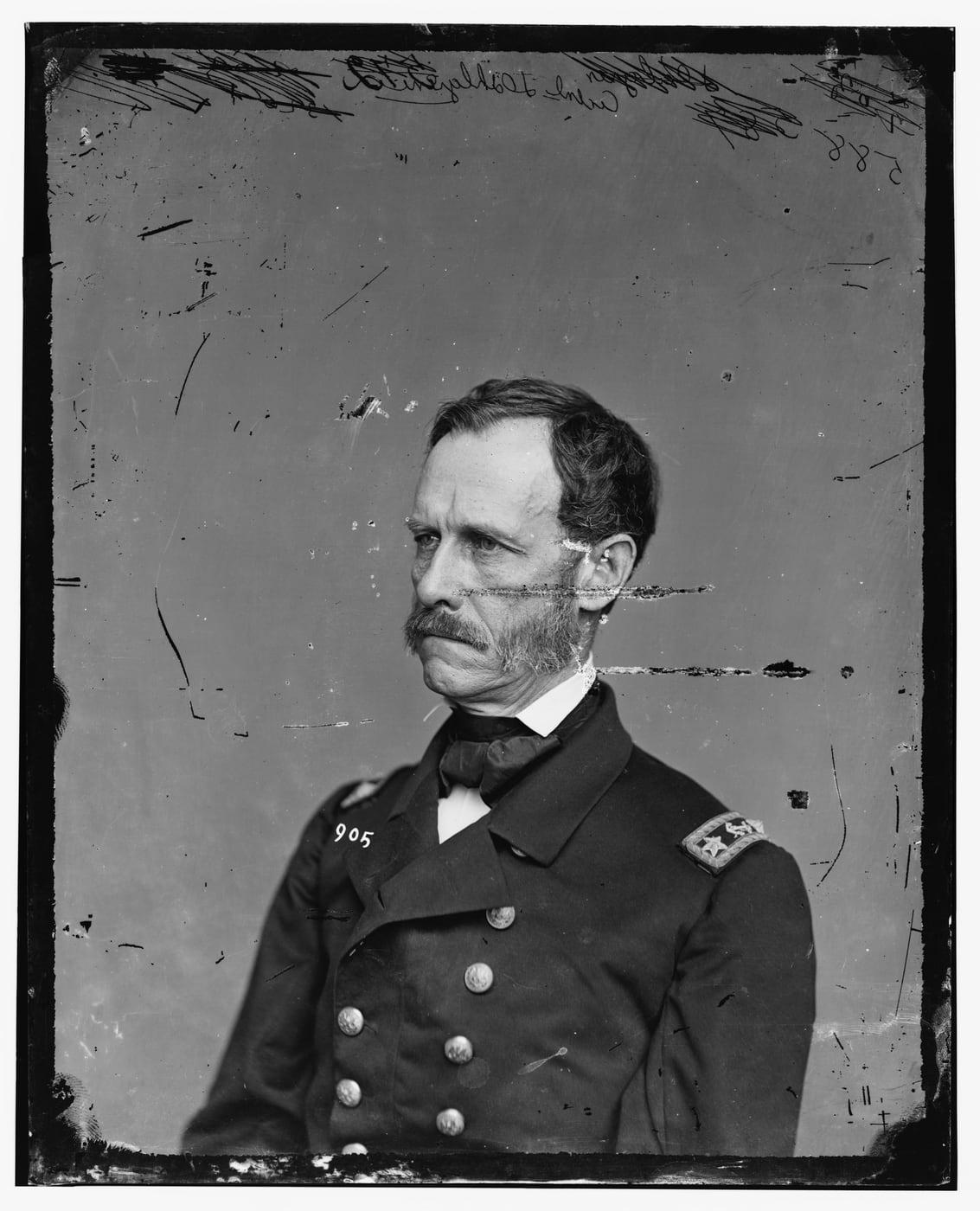
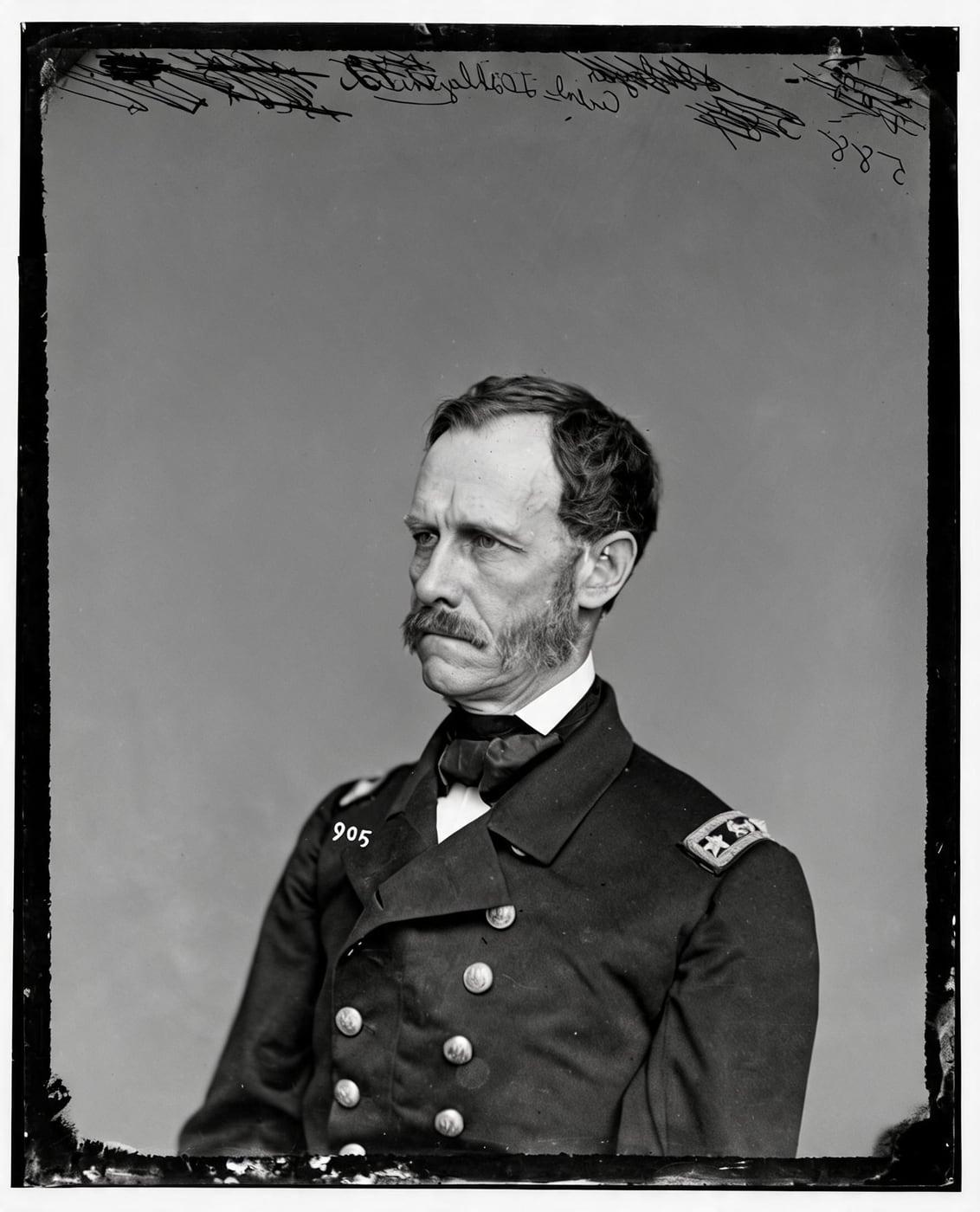
Restored Military Photos Before and After
Drag the handle to compare. The example is a US Navy officer's portrait from the Civil War era, on a scratched and chipped glass plate. The scratches and specks are gone; his face, his uniform, its buttons and the insignia on his shoulder are as they were.
The military photo before-and-after examples below are real Restore Old Photos results, showing faded, damaged originals turned into clearer images. The restored examples show sharper facial and uniform detail, with color added where shown.
Restore my photoRestore Old Military Photos Online With AI
Restore Old Photos repairs old military photos online with AI, reducing creases, fading, scratches, stains, and storage damage while sharpening faces and uniform detail. Upload a clear scan, review the restored image, and download it; keep the original scan to identify people, uniforms, and insignia.
- per photo
- ≈ 1 min
- per photo
- per photo
- 1 credit
- per photo
- then your upload is deleted
- 24 h
- then your upload is deleted
Types of Military and War Photos
The main types of military and war photos are listed below, starting with the formal service portrait:
Military Photos by War Era
Military photos by war era span Civil War portraits, World War I and World War II portraits, and Korean War and Vietnam War snapshots.
Civil War Portraits
Civil War portraits survive today as ambrotypes, tintypes, and cartes-de-visite, many with fading, scratches, stains, or case wear obscuring faces and uniforms, and for many Union and Confederate soldiers the portraits are the last known record of what they looked like, according to “Liljenquist Family Collection of Civil War Photographs” by the Library of Congress Prints & Photographs Division. Restore Old Photos repairs the visible damage while keeping the original pose and historical details.
World War I and World War II Portraits
World War I and World War II portraits today show fading, scratches, creases, stains, and weakened contrast, and the training, combat, and support scenes listed in “World War II Photos” by the U.S. National Archives, June 2021, are available only in black and white. The Restore tool reduces visible damage, sharpens facial and uniform details, and balances tones while keeping the people, clothing, insignia, and composition.
Korean War and Vietnam War Snapshots
Korean War and Vietnam War snapshots today show combat scenes, patrols, vehicles, wounded service members, and daily life, many marked by fading, scratches, stains, and creases. Restore Old Photos reduces that damage and scan noise and sharpens visible faces and uniforms without inventing unclear insignia or scene details.
Damage Common on Old Military Photos
The damage common on old military photos includes creases, tears, scratches, fading, discoloration, curling, dust, stains, and deterioration from heat, humidity, light, or unsuitable storage.
Creases From Folded Wallet Prints
Creases from folded wallet prints appear as sharp lines, flattened ridges, cracks, or breaks that can obscure faces and uniform details. Restore Old Photos repairs the crease marks and the damaged image areas while keeping the original framing and visible historical details.
Footlocker and Attic Storage Damage
Footlocker and attic storage damage leaves military photos warped, brittle, stained, mold-damaged, or faded, because heat speeds chemical deterioration and the mix of high humidity and high temperature encourages mold and curling, as the Northeast Document Conservation Center explains in the leaflet “5.3 Care of Photographs”, revised 2019. The Restore tool reduces visible stains, discoloration, mold marks, and deformation.
Fading on Black-and-White Service Prints
Fading on black-and-white service prints weakens contrast and detail and sometimes causes yellowing or a general tonal shift. Restore Old Photos strengthens contrast, recovers visible detail, and corrects yellowing and discoloration while keeping the photograph’s composition and any deliberate sepia tone.
How to Restore an Old Military Photo Online
To restore an old military photo online, follow five steps: scan the front and back, upload the front scan, repair creases and storage damage, recover facial and uniform detail, then preview and download the result.
Step 1 of 5
Scan the Front and Back of the Print
Scan the military photo’s front and back at about 600 ppi to keep image detail and any handwritten names, dates, or unit notes. Handle the print by its edges, save both scans, then upload the front scan for restoration.
Restore my photoFig. 1 · The photo you add Step 2 of 5
Upload the Military Photo
Upload the front scan of the military photo to Restore Old Photos, then follow the on-screen instructions. A clear, well-lit scan gives the Restore tool more detail to work from.
Step 3 of 5
Repair Creases and Storage Damage
Restore Old Photos detects fold lines, tears, stains, dust, and scratches in the uploaded military photo. The Restore tool then repairs the damaged areas while keeping the original composition.
Step 4 of 5
Recover Faces and Uniform Detail
Restore Old Photos clarifies visible facial features, insignia, fabric, and uniform edges without changing the person. Compare the restored photo with the original before downloading it, especially around the eyes, mouth, hairline, and badges, because a restoration can only sharpen detail the original print still holds.
Step 5 of 5
Preview and Download the Restored Photo
Use the before-and-after slider to compare the restored military photo with the original, checking faces, uniforms, insignia, and framing. When the result meets your needs, download the restored 2K image for printing, sharing, or archival storage.
Restore my photo Same people · checkedFig. 5 · Restored
Historical Accuracy in Restored Military Photos
Historical accuracy in restored military photos depends on keeping uniforms, insignia, medals, ribbons, faces, weapons, and other identifying details identifiable, without treating AI repair as historical evidence.
Keeping Uniforms and Insignia Recognizable
Restore Old Photos keeps uniforms and insignia readable by repairing scratches, creases, fading, and damaged texture while leaving the shape, placement, and symbols of every badge unchanged. The National Army Museum explains in “Regimental badges” that soldiers wear a badge on their headdress to identify the regiment or corps they belong to, and that the style of crown on a badge can date it. A restoration cannot identify insignia that is missing or too damaged to read.
Medals and Ribbons After AI Restoration
Medals and ribbons read with more definition after AI restoration when the original photo preserves their shape, placement, and tone, and Restore Old Photos is instructed never to alter a medal or ribbon. An AI restoration cannot confirm an award, ribbon device, award count, or service history, so verify those details against official military records.
Recovering Faces in Group Military Photos
Restore Old Photos recovers faces in group military photos by reducing blur, scratches, fading, and other damage on each face while keeping every person’s features unchanged. A same-faces check compares each result with the upload, so no person is added, removed, or altered. Names, ranks, insignia, medals, and facial details that the original cannot show stay unconfirmed, because a restored image cannot prove who appears in the photograph.
Where AI Must Not Invent Military Details
Restore Old Photos recovers visible contrast, edges, facial features, and uniform patterns from the information that remains in the photograph. Where damage has erased part of a military photo, the Restore tool never invents a face, uniform detail, insignia, or medal to fill the gap, and a burned-away area is continued only where it was plain background or border. Keep the original scan and verify military details against service records.
Uses for Restored Military Photos
The uses for restored military photos include Veterans Day and Memorial Day tributes, funeral and memorial displays, and family service-history records.
Veterans Day and Memorial Day Tributes
A restored military photo serves a Veterans Day tribute by showing a veteran’s service portrait in sharp detail in a family display, commemorative post, or remembrance program. For Memorial Day, the restored portrait honors a fallen service member by preserving that person’s likeness for remembrance.
Military Funeral and Memorial Displays
A restored military photo serves a military funeral or memorial display as a clearer, respectful image that keeps the veteran’s identifiable face, uniform, and composition. Families can print, frame, or add the photo to a digital tribute.
Family Service History Records
A restored military photo adds a clearer image of an ancestor to a family service history record, alongside the documented rank, unit, enlistment dates, and service events. Pairing the photograph with National Archives service records, pension files, and unit histories connects the image with the ancestor’s documented service.
How Restore Old Photos Restores Military Portraits Without Altering the Record
Restore Old Photos restores a military portrait without altering the record by repairing the damage while keeping the original framing and the service member’s face, uniform, insignia, and medals. Every result goes through a same-faces check, so the restored portrait shows the same people with nothing added or removed. Each download carries a metadata label identifying the file as AI-restored.
Military Photo Restoration Pricing
1 credit restores one photo, and a second, bolder version is 1 more. Packs start at $2.99, never renew, and their credits never expire.
Pack 01
Starter
A few favourite photos, restored and colorized.
$2.99one-time
60¢ a photo
- 5 photos restored, colorized or enhanced
- Or 1 animated clip
- Full size, no watermark
- Credits never expire
- Never renews
Most chosen
Pack 02
Family
An album's best photos, with a clip of the one you love most.
$7.99one-time
44¢ a photo
- 18 photos restored, colorized or enhanced
- Or 4 animated clips
- Full size, no watermark
- Credits never expire
- Never renews
Pack 03
Archive
For the shoebox in the attic and the family historian.
$19.99one-time
40¢ a photo
- 50 photos restored, colorized or enhanced
- Or 12 animated clips
- Full size, no watermark
- Credits never expire
- Never renews
One-time payments in US dollars. Compare credit packs and monthly plans
Military Photo Restoration FAQ
Can AI Add Color to a Black-and-White Service Portrait?
Yes, AI can add color to a black-and-white service portrait, giving it plausible period tones that extend to the colors of the uniform.
- Colorizing Uniforms in Period-Accurate Tones: Colorize gives a military uniform natural-looking period color while changing only the color, because a luma lock keeps the photograph’s own light and shade pixel for pixel. Uniform colors varied by period, branch, garment, and campaign, so the colorized tones are a plausible interpretation rather than a documented record.
Can a Restored Military Photo Stay True to the Original Service Record?
Yes, a restored military photo can stay true to the original service record when the restoration repairs visible damage and keeps the original people, uniforms, insignia, and composition. Families should still verify uncertain features against the original print and independent records, because the physical photograph remains the authoritative record. Restoring old military and war photos online creates a clearer, shareable copy while keeping that record intact.
Can you restore a unit or regiment group photo?
Yes. Every person in the group is checked, with nobody added or lost. Scan the print at 600 dpi or more, because faces in a long row are small.
Will the people still look like themselves?
That is the one thing Restore Old Photos checks on every result. Each one gets a structure score against your original and an AI check that the same people are there, with nothing added or removed. A result that fails is remade once on a backup model; if it still fails, it's dropped and the credit comes back to you.
Which Historic War Photos Have Been Brought Back in Color?
The historic war photos brought back in color include World War II combat and home-front scenes, Normandy invasion images, Pacific campaign photographs, military personnel, factories, and wartime workers, along with selected World War I, Korean War, and Vietnam War photographs.
- Colorized 1940s Wartime Photos: Colorized 1940s wartime photos show home-front factories, women in defense industries, aviation training, military facilities, and frontline scenes with bombers, artillery crews, and troops in Italy. Digital collections, books, and exhibitions show the 1940s images today as original color photographs or later colorizations.
- Famous War Photographs and Their Stories: Joe Rosenthal’s Raising the Flag on Iwo Jima captured six U.S. Marines raising an American flag atop Mount Suribachi on February 23, 1945, according to “75th Anniversary of the Battle of Iwo Jima” by Keith Huxen of The National WWII Museum, February 2020. Coast Guard photographer Robert F. Sargent’s Into the Jaws of Death shows 1st Infantry Division soldiers landing on Omaha Beach on D-Day, June 6, 1944, as the National Archives documents in “Into the Jaws of Death, June 6, 1944”, 2024. Columbia University Libraries reports in “Execution of Viet Cong Officer” that Eddie Adams’s photograph of Nguyễn Văn Lém’s execution in Saigon on February 1, 1968, became an iconic symbol of the brutality of the Vietnam War.
- Mathew Brady's Civil War Portraits: Mathew Brady’s Civil War portraits are studio and field photographs of soldiers, officers, and other figures, made by Brady and the photographers working under his direction from 1861 to 1865. Brady’s documentation of the Civil War was his most important contribution to American history, and from 1861 he sent photographers into the field to record it, according to “Brady-Handy Collection: Background and Scope” by the Library of Congress Prints & Photographs Division.
Where Can You Find Old Military Photos of an Ancestor?
Old military photos of an ancestor can be found in family collections, unit histories, veterans’ organizations, local and state archives, and National Archives photograph collections, while recent military service and medical records are not online and must be requested, according to “Request Military Service Records” by the U.S. National Archives, November 2026.
- Dating an Unlabeled Service Photo: The uniform style, insignia, weapons, and photo format of an unlabeled service photo help estimate when the photo was taken. Many Civil War soldier portraits appear as cased ambrotypes or tintypes, including the sixth-plate, ninth-plate, and quarter-plate formats documented in “Ambrotypes and Tintypes in the Liljenquist Collection” by the Library of Congress.
- Tintype Portraits of Civil War Soldiers: Tintype portraits of Civil War soldiers are photographs made on thin iron sheets coated with a dark lacquer or enamel, displayed in small decorative cases, frames, or paper envelopes. Surviving tintypes document Union and Confederate soldiers, their uniforms, weapons, and families.
How Should Original Military Prints Be Kept?
Original military prints should be kept in a cool, dry, stable place, ideally at or below 70°F and at 30–50% relative humidity, away from direct light, heat, attics, basements, and leaks. Place each print in a folder or sleeve that passes the Photographic Activity Test, and handle prints by the edges with clean, dry hands, as the Library of Congress advises in “Care, Handling, and Storage of Photographs”.
What does Restore Old Photos do with the photos I upload?
The original is used only to make your results and is deleted from our servers within 24 hours by an hourly clean-up, or at once if you delete it. Your results stay in your account until you delete them. Before upload, your browser shrinks the photo and strips its location data.
Does Restore Old Photos use my photos to train AI?
No. Restore Old Photos never uses your photos or results to train AI models. They're sent only to the AI providers that restore and check them, whose terms allow them to use what we send only to do that job.
Does Restore Old Photos have a free trial?
No, and so there's no trial to cancel and no weekly plan. You pay per photo with a one-time pack, from $2.99 (from 40¢ a photo), and a result that fails the check never costs a credit: it's dropped and the credit comes back.
What if a result fails?
You don't pay for it. Anything that isn't delivered, including a result held back because it failed our likeness check, is refunded to your balance automatically.
More Ways to Repair Old Photos
Restore military and war photos
Their service portrait, clear again, exactly as they were
Restore my photo