Restore Old Photos / Water damaged photo restoration
Water Damaged Photo Restoration: Repair Flood and Water Stains on Old Photos Online
Rescue the family photos a flood or a leak left stained, and get them back clean in about a minute, with every face kept as it was.
A water damaged photo is restored online by drying the print, scanning it and letting AI repair the stains, tide lines and lifted emulsion while keeping the same faces. Water damaged photo restoration is the digital repair of prints marked by floods, leaks or soaking. Common signs of water damage include water stains, lifted emulsion, color bleeding and mold, and resin-coated and fiber-based prints survive soaking in different ways. The steps are drying the print, scanning it, uploading the scan and running an AI repair that removes stains and smooths damaged areas. Before-and-after results show the changes, and Restore Old Photos repairs water stains and missing detail in one pass. Start the Restore Water Damaged Photos Online action to repair a print.


Water Damaged Photo Restorations Before and After
Drag the handle to compare. This is an illustration, not a result: we added tide lines, water stains and lifted patches digitally to an 1854 public-domain family photo, so you can see what the repair aims for. With your own photo, every result is checked against your original before you see it.
The water damaged photo restorations before and after are Restore Old Photos illustrations, showing water stains, tide lines, fading, scratches and tears added digitally to a clean photo. The after versions show what a repair aims for: cleaner and sharper, with no damage and better color and contrast.
Restore water damaged photos onlineRestore Water Damaged Photos Online With AI
Restore Old Photos restores water damaged photos online with AI, removing tide lines, water stains and blotches and smoothing lifted, bubbled or stuck patches to match the tones around them. A part of the photo that washed away stays lost.
- per photo
- ≈ 1 min
- per photo
- per photo
- 1 credit
- per photo
- then your upload is deleted
- 24 h
- then your upload is deleted
Signs of Water Damage on Old Photos
The signs of water damage on old photos appear first as water stains and tide lines, followed by cloudy patches, softened or warped paper, color bleeding, lifted emulsion and mold spots.

Fig. 3.1 · Illustration Water Stains and Tide Lines
Water stains and tide lines look like brown, yellow or cloudy marks with sharp edges where water moved across a print. Restore Old Photos removes the stains and tide lines and keeps the detail still visible beneath them.

Fig. 3.2 · Illustration Lifted or Missing Emulsion
Lifted or missing emulsion looks like peeling, flaking, cracked or blank patches where the image layer has separated from the print. Restore Old Photos smooths lifted, bubbled or stuck patches to match the surrounding tones, while content washed away with the emulsion stays lost.

Fig. 3.3 · Illustration Color Bleeding From Wet Dyes
Color bleeding from wet dyes looks like color spreading past its original edges and blurring the detail around it. Restore Old Photos reduces the color shifts and restores cleaner color edges while keeping the same faces.
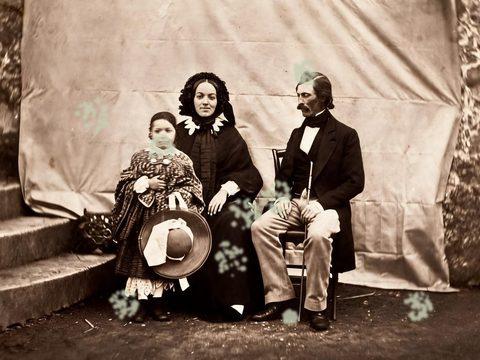
Fig. 3.4 · Illustration Mold Spots After Slow Drying
Mold spots on a slowly dried photo look fuzzy and colored, damp and smearing while the mold is active, and like a colored stain or smudge once dry, according to “Mould Prevention and Collection Recovery: Guidelines for Heritage Collections” by Sherry Guild and Maureen MacDonald, Canadian Conservation Institute, 2020. Restore Old Photos removes the visible spots and matches the cleaned areas to the photo around them.
Prints That Survive Water Damage Best
Resin-coated color prints, fiber-based black-and-white prints and film each survive soaking differently, and no print type is waterproof, because water softens gelatin and dissolves image layers.
Resin-Coated Color Prints
Resin-coated color prints keep water out of their plastic-coated paper base, yet their three or more gelatin layers make color prints more sensitive to damage after soaking than black-and-white photographs, as the Canadian Conservation Institute reports in “Care of Colour Photographic Materials” by Klaus B. Hendriks, revised by Joe Iraci, 2007. Restore Old Photos reduces stains and tide lines and corrects color shifts on the scan.
Fiber-Based Black-and-White Prints
Fiber-based black-and-white prints withstand water better than color prints, though soaking can warp the paper and soften the gelatin layer. Once the print is dry, Restore Old Photos reduces water stains, tide lines and fading and smooths damaged patches.
Film and Transparencies After a Flood
Film and transparencies can survive a flood when kept wet until a conservator can rewash and dry them, because drying too soon can make the layers stick. A high-resolution scan of the dried film can then be restored to reduce water marks and color shifts.
How to Restore a Water Damaged Photo Online
To restore a water damaged photo online, follow five steps: dry the print completely, scan it whole at high resolution, upload the scan, run the water damage repair and download the restored copy.
Step 1 of 5
Let the Print Dry Completely
To let the print dry completely, lay it face up on a clean absorbent surface, apart from other prints and never stacked. Gentle air without heat dries the print, and the print is ready to scan once no longer tacky.
Restore water damaged photos onlineFig. 1 · The photo you add · illustration Step 2 of 5
Scan the Dry Print at High Resolution
Scan the fully dry print at 300 pixels per inch or higher, depending on the size of the original. Keep the entire photograph in the frame without cropping, so Restore Old Photos receives every edge, stain and damaged area.
Fig. 2 · The photo you add · illustration Step 3 of 5
Upload the Scan
Upload the dry, uncropped scan of the water-damaged print to Restore Old Photos, one photo per upload. The upload is shrunk and stripped of location data on your device before the repair begins.
Step 4 of 5
Run the Water Damage Repair
Run the water damage repair on the uploaded scan and check that the same faces and details remain. The faithful version keeps the print’s original look, and Restore Old Photos can add a bolder version with stronger stain removal for 1 more credit.
Step 5 of 5
Download and Print the Restored Copy
Download the restored photo at about 2K (2048 px on its long side), keep the original scan unchanged and print the repaired copy on suitable photographic paper. A printed digital copy protects the original print from further handling.
Restore water damaged photos online Same people · checkedFig. 5 · After (illustration)
Benefits of Restoring Flood Photos Online
Restoring flood photos online keeps a digital backup, removes visible water stains and discoloration, and repairs every print without manual retouching.
Photo-by-Photo Restoration of a Soaked Album
Restore Old Photos restores a soaked album one photo at a time, and each repair takes about a minute. Larger collections suit a bigger credit pack or the monthly plan, with every photo going up as its own upload.
One Credit per Repaired Print
Each repaired print costs 1 credit from a credit pack or monthly plan. Restore Old Photos remakes a result that fails the same-faces check once, then refunds the credit, so a failed result never costs a credit.
How Restore Old Photos Repairs Water Stains and Missing Detail in One Pass
Restore Old Photos repairs water stains and missing detail in one pass, removing stains, filling missing patches from the image around them and repairing tears, creases and fading while keeping the same faces. The Restore tool makes a faithful version, can add a bolder version for 1 more credit and can add colour at no extra credit.
Water Damaged Photo Restoration Pricing
1 credit restores one photo, and a second, bolder version is 1 more. Packs start at $2.99, never renew, and their credits never expire.
Pack 01
Starter
A few favourite photos, restored and colorized.
$2.99one-time
60¢ a photo
- 5 photos restored, colorized or enhanced
- Or 1 animated clip
- Full size, no watermark
- Credits never expire
- Never renews
Most chosen
Pack 02
Family
An album's best photos, with a clip of the one you love most.
$7.99one-time
44¢ a photo
- 18 photos restored, colorized or enhanced
- Or 4 animated clips
- Full size, no watermark
- Credits never expire
- Never renews
Pack 03
Archive
For the shoebox in the attic and the family historian.
$19.99one-time
40¢ a photo
- 50 photos restored, colorized or enhanced
- Or 12 animated clips
- Full size, no watermark
- Credits never expire
- Never renews
One-time payments in US dollars. Compare credit packs and monthly plans
Water Damaged Photo FAQ
Can a Fully Submerged Photo Still Be Restored?
Yes, a fully submerged photo can still be restored if its paper, emulsion or film base survives. Digital restoration removes stains and tide lines, but image information that washed away stays lost. After the print dries and is scanned, water damaged photo restoration online repairs the surviving image and creates a restored copy of the old photo.
Can AI Also Fix Tears and Scratches on a Flood-Damaged Photo?
Yes, AI can fix tears and scratches on a flood-damaged photo, and Restore Old Photos repairs the creases, small tears and scratches left by wet handling.
- Repairing Creases and Tears Left by Wet Handling: Restore Old Photos repairs creases and tears left by wet handling by rebuilding the damaged areas from nearby texture, tone and detail while keeping faces and composition intact. Severe tears or large missing sections need interpretation rather than exact recovery.
Does restoring the scan fix the original print?
No. We repair a digital copy, and the print stays as it is. Download the restored file and have it printed if you'd like a new copy for the album.
Will the people still look like themselves?
That is the one thing Restore Old Photos checks on every result. Each one gets a structure score against your original and an AI check that the same people are there, with nothing added or removed. A result that fails is remade once on a backup model; if it still fails, it's dropped and the credit comes back to you.
What Should You Do With Wet Photos Before Restoring Them?
Before restoring them, wet photos should be lifted out of envelopes and album pages, separated, handled by the edges and air-dried, and the U.S. National Archives advises in “Emergency Salvage of Flood Damaged Family Papers” (August 1993) that photographs which cannot be air dried within two days should be frozen to inhibit mold growth.
- Freezing Soaked Prints Until They Can Be Dried: Soaked prints should be frozen when air-drying within two days is not possible or when the prints stick together or to glass. Interleave the prints with non-woven polyester or waxed paper and seal each stack in a labeled plastic bag, according to “Emergency Salvage of Wet Photographs” by Gary Albright, Northeast Document Conservation Center, revised 2020.
- Separating Prints Stuck to Frame Glass: To separate a print stuck to frame glass, do not pull the wet photograph off the glass, because the emulsion can tear and the image loss is permanent. Keep the print in its frame, dry it glass-side down and ask a photograph conservator about separation; scanning through the glass may avoid removal damage.
- Flattening Prints That Curled While Drying: To flatten a print that curled while drying, place it between clean, dry blotters under a flat board or light weight for several days. A tightly curled, cracked or fragile print should not be forced flat; a conservator can advise on controlled humidification.
Can Mold Grow on Water Damaged Photos?
Yes, mold can grow on water damaged photos, and Mary F. Striegel of the National Park Service warns in “Preservation Matters: Disasters - Saving Wet Photographs” (September 2022) that mold can begin to grow within 48 hours, so prints soaked by floods, fire hoses or damp storage need prompt drying.
- Fire Hose Water on Photos After a House Fire: Fire hose water damages photos after a house fire by soaking, staining and warping the prints, sticking them together or to their mounts, and loosening the image emulsion. Soot, heat brittleness and mold risk add to the damage, so fire-damaged prints need minimal handling before scanning.
- Storing Dried Prints Away From Damp: Dried photographic prints should be stored away from damp in a cool, dark place at 30% to 50% relative humidity, without the humidity cycling more than 5% a day, as the Library of Congress recommends in “Care, Handling, and Storage of Photographs,” revised in 2002.
What does Restore Old Photos do with the photos I upload?
The original is used only to make your results and is deleted from our servers within 24 hours by an hourly clean-up, or at once if you delete it. Your results stay in your account until you delete them. Before upload, your browser shrinks the photo and strips its location data.
Does Restore Old Photos use my photos to train AI?
No. Restore Old Photos never uses your photos or results to train AI models. They're sent only to the AI providers that restore and check them, whose terms allow them to use what we send only to do that job.
Does Restore Old Photos have a free trial?
No, and so there's no trial to cancel and no weekly plan. You pay per photo with a one-time pack, from $2.99 (from 40¢ a photo), and a result that fails the check never costs a credit: it's dropped and the credit comes back.
What if a result fails?
You don't pay for it. Anything that isn't delivered, including a result held back because it failed our likeness check, is refunded to your balance automatically.
More Ways to Repair Old Photos
Water damaged photo restoration
The photo the water nearly took, back again
Restore water damaged photos online