Restore Old Photos / Restore old wedding photos
Restore Old Wedding Photos: Repair and Revive Vintage Wedding Pictures Online
Bring your family’s wedding photos back to their best, ready for the next anniversary, in about a minute and with every face kept as it was.
An old wedding photo is restored online by uploading a scan and letting AI repair the damage, recover dress detail, and sharpen the couple’s faces while keeping the same people. Wedding photo restoration is the digital repair of fading, scratches, creases, stains, and album marks on vintage wedding pictures, from studio portraits and reception snapshots to album prints and 1950s–1980s color photos. Scan and upload each print, then review how AI repairs damage, refines faces and fabric, or colorizes a black-and-white image. Before-and-after examples show the kind of repair, while 2K downloads help rebuild a wedding album one photo at a time. Restore Old Photos brings old wedding pictures back to life; choose the Restore Old Wedding Photos Online action to open the restoration page.
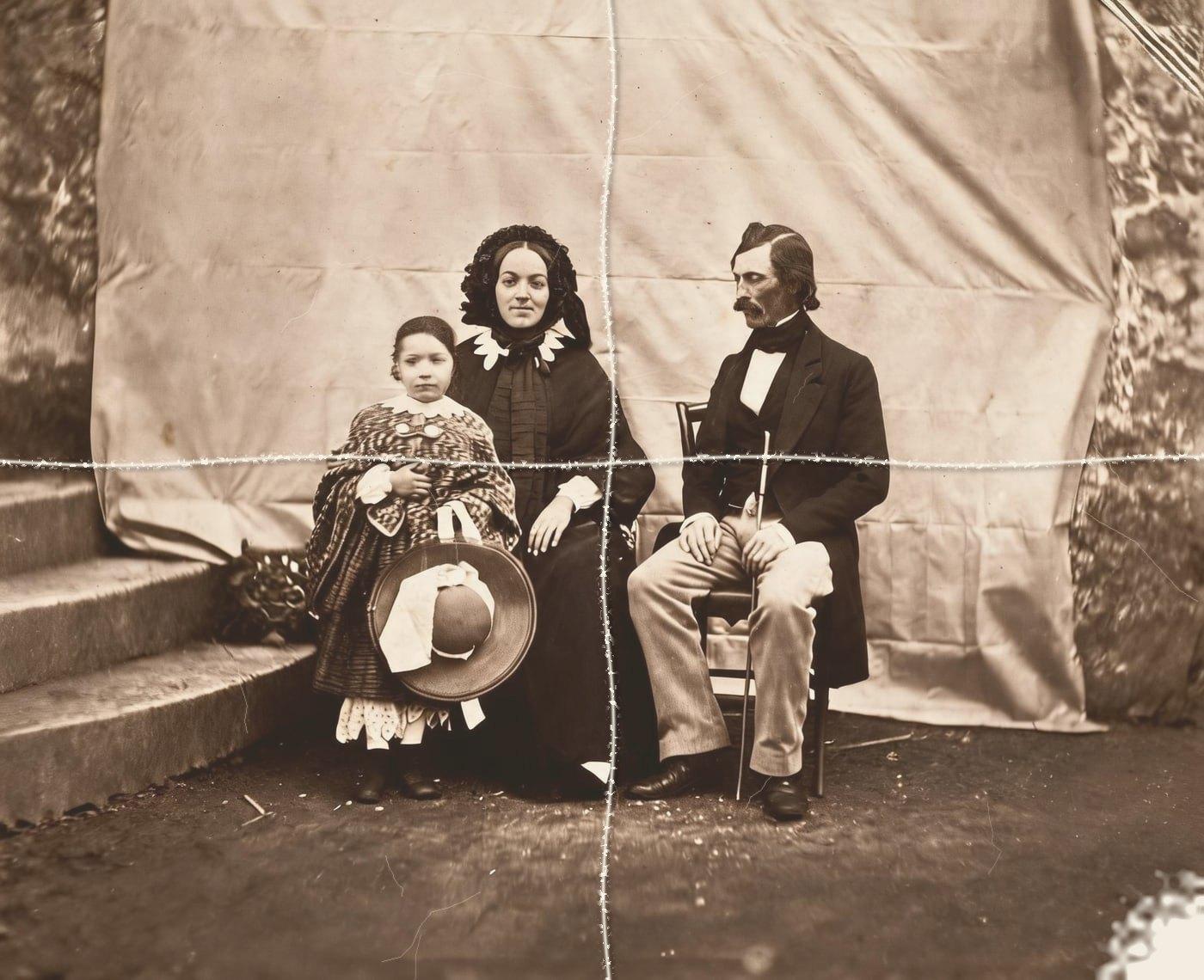
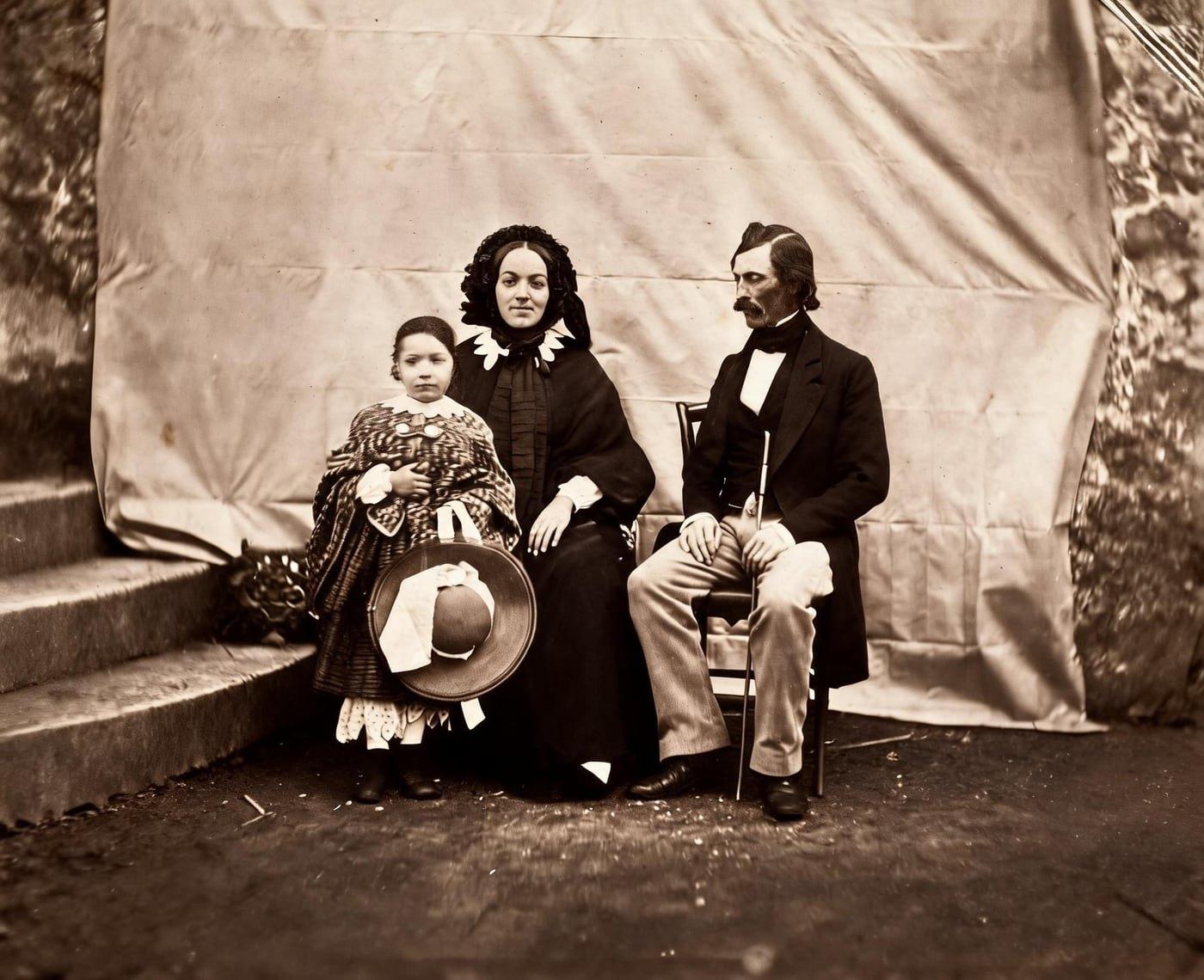
Restored Wedding Photos Before and After
Drag the handle to compare. This is an illustration, not a result: we added two fold creases, a worn corner and fading digitally to an 1854 public-domain family photo, so you can see what the repair aims for. With your own photo, every result is checked against your original before you see it.
The before-and-after examples from Restore Old Photos compare photos with damage added digitally against the clean photographs, illustrating the repair. Restored versions show repaired visible damage, clearer detail, and preserved composition, with natural-looking color in examples that use colorization.
Restore old wedding photos onlineRestore Old Wedding Photos Online With AI
Restore Old Photos uses AI to repair scratches, tears, stains, creases, fading, blur, and noise in old wedding photos. Upload a digital scan to improve image clarity, then download the restored photo in high quality.
- per photo
- ≈ 1 min
- per photo
- per photo
- 1 credit
- per photo
- then your upload is deleted
- 24 h
- then your upload is deleted
Types of Old Wedding Photos
The types of old wedding photos are formal studio portraits, candid reception snapshots, wedding album prints, and color prints from the 1950s through the 1980s.
Damage Found on Old Wedding Photos
The damage found on old wedding photos ranges from blown-out dress highlights and faded colors to album sleeve marks, scratches, creases, tears, stains, curling, and cracked emulsion.
Blown-Out White Dresses and Veils
Blown-out white dresses and veils appear as flat, featureless areas that hide folds, lace, seams, and embroidery. Restore Old Photos reduces excessive brightness and recovers the fabric detail the photo still records, but clipped pure-white areas contain no image data to restore.
Faded Color in Reception Prints
Faded color in reception prints appears as washed-out tones, uneven color balance, or yellow, orange, and cyan casts caused by aging photographic dyes. Restore Old Photos corrects the color shifts, restores tonal balance and contrast, and preserves the people and details in the reception print.
Album Sleeve Marks and Stuck Prints
Album sleeve marks appear as cloudy streaks, adhesive residue, or discoloration, while stuck prints may bond to the album page. Restore Old Photos reduces visible marks and repairs damaged image areas on the scan, but a conservator should handle prized stuck prints rather than forcing them loose.
Scratches and Creases From Handling
Scratches and creases from handling appear as thin white or dark lines, folds, or raised breaks across a wedding photo, sometimes obscuring faces, clothing, or background details. Restore Old Photos removes the visible marks and repairs the damaged areas while preserving the couple’s appearance.
How to Restore an Old Wedding Photo Online
To restore an old wedding photo online, follow five steps: scan the print, upload the image, repair damage and recover dress detail, sharpen the couple’s faces with Enhance, and download a printable copy.
Step 1 of 5
Scan the Print Outside Its Album Sleeve
To scan the print outside its album sleeve, lift the wedding print out only if it comes away easily, then scan it on a clean flatbed scanner without fingerprints or pressure. A print that stays stuck is photographed in place or left to a photograph conservator, and the digital scan goes on to the upload.
Restore old wedding photos onlineFig. 1 · The photo you add · illustration Step 2 of 5
Upload the Wedding Photo
To upload the wedding photo, select the scanned file from a computer or phone in the Restore Old Photos upload form. A high-resolution scan gives the Restore tool more detail to work with when repairing damage and preserving faces, lace, and fabric texture.
Step 3 of 5
Repair Damage and Recover Dress Detail
To repair damage and recover dress detail, run the Restore tool, which repairs scratches, creases, stains, and fading, then recovers visible dress and veil texture where image detail remains. Review the fabric repair before using Enhance to refine the couple’s faces while keeping them recognizable as the same people.
Step 4 of 5
Enhance the Faces of the Couple
To bring out the faces of the couple, run Enhance on the repaired photo to sharpen the bride’s and groom’s faces without inventing facial detail. The same-faces check confirms that the restored portrait still depicts the same people.
Step 5 of 5
Download a Printable Copy
To download a printable copy, save the 2K file of the reviewed wedding photo as an archive copy. The downloaded copy serves for printing, framing, sharing, or enlargement, and downloading leaves the original scan unchanged.
Restore old wedding photos online Same people · checkedFig. 5 · After (illustration)
Colorizing a Black-and-White Wedding Photo
Colorize adds natural-looking, period-appropriate hues to a black-and-white wedding photo by estimating colors from the scene and clothing. The luma lock preserves the photo’s own light, shade, and contrast, while the added colors remain interpretations rather than verified historical colors.
What a Restored Wedding Photo Includes
A restored wedding photo includes a 2K printable file, private photo handling, and restoration for one credit.
2K File for Enlargement
Restore Old Photos provides a 2K download of the restored wedding photo, ready for printing at moderate sizes. Enhance can enlarge a small print up to four times for larger reproductions.
Private Upload of Family Photos
Restore Old Photos shrinks the wedding photo and strips its location data in the browser before upload. The original upload is deleted from the Restore Old Photos servers within 24 hours.
One Credit per Restored Wedding Photo
Each restored wedding photo costs 1 credit from a credit pack or monthly plan. A result that fails the same-faces check never costs a Restore Old Photos credit.
How Restore Old Photos Brings Old Wedding Photos Back to Life
Restore Old Photos brings old wedding photos back to life with the Restore tool, which repairs scratches, tears, stains, creases, and fading on an old wedding photo in one pass. The Restore tool makes a faithful version and can add a bolder version, 1 credit each, with color added in the same pass at no extra credit.
Wedding Photo Restoration Pricing
1 credit restores one photo, and a second, bolder version is 1 more. Packs start at $2.99, never renew, and their credits never expire.
Pack 01
Starter
A few favourite photos, restored and colorized.
$2.99one-time
60¢ a photo
- 5 photos restored, colorized or enhanced
- Or 1 animated clip
- Full size, no watermark
- Credits never expire
- Never renews
Most chosen
Pack 02
Family
An album's best photos, with a clip of the one you love most.
$7.99one-time
44¢ a photo
- 18 photos restored, colorized or enhanced
- Or 4 animated clips
- Full size, no watermark
- Credits never expire
- Never renews
Pack 03
Archive
For the shoebox in the attic and the family historian.
$19.99one-time
40¢ a photo
- 50 photos restored, colorized or enhanced
- Or 12 animated clips
- Full size, no watermark
- Credits never expire
- Never renews
One-time payments in US dollars. Compare credit packs and monthly plans
Wedding Photo Restoration FAQ
Which Anniversaries Call for a Restored Wedding Photo?
The anniversaries that call for a restored wedding photo are the 25th silver, 40th ruby, 50th golden, and 60th diamond anniversaries, along with other family events honoring the couple’s story.
- Golden Anniversary Slideshows: Restored wedding photos open a golden anniversary slideshow, connecting the couple’s wedding portrait with photographs from each decade together. Arrange the images chronologically, add captions and music, then close with recent photographs or a “then and now” comparison.
- Framing a Restored Wedding Portrait: Frame a restored wedding portrait with an acid-free, lignin-free mat and reversible mounting, leaving space between the print and glazing. Choose UV-filtering glass or acrylic and display the portrait away from direct sunlight, as the U.S. National Archives and Records Administration advises in “How to Preserve Family Archives (papers and photographs),” last reviewed July 2025.
- Restored Wedding Photos as Family Gifts: Restored wedding photos make thoughtful family gifts as framed portraits, photo-book pages, or prints for parents, grandparents, spouses, and relatives. Copies let several family members share the image while the original photograph stays preserved for future generations.
Can an Old Wedding Photo Be Restored Without Losing Its Vintage Character?
Yes, an old wedding photo can be restored without losing its vintage character when the restoration preserves the original composition, lighting, grain, and period appearance. Conservative edits repair fading and surface damage without making the photograph look artificially modern, while an untouched scan preserves the original; restoring old wedding photos online can therefore revive the image while respecting its history.
Can you restore a large wedding group photo?
Yes. Every person in the group is checked: a result that loses, adds or changes anyone is remade once, then refunded if it still fails. Scan the print at a high resolution so small faces have detail to work with.
Can I make an old wedding photo bigger for a frame?
Yes. Restore it first, then run Enhance on the result: it sharpens faces and makes the photo up to 4 times larger without inventing new features. That's 1 more credit.
Can I colorize a black and white wedding photo?
Yes. Tick Also add colour and it's repaired and colorized in one pass, for the same credit. The colours are plausible for the era, not a record of the day.
Will the people still look like themselves?
That is the one thing Restore Old Photos checks on every result. Each one gets a structure score against your original and an AI check that the same people are there, with nothing added or removed. A result that fails is remade once on a backup model; if it still fails, it's dropped and the credit comes back to you.
Can AI Restore Every Photo in a Wedding Album?
Yes, AI can restore every photo in a wedding album photo by photo, with each print uploaded and processed on its own.
- Restoring Dozens of Album Prints One by One: Restore Old Photos restores dozens of album prints photo by photo, one upload at a time, with each print taking about a minute. A bigger credit pack or the monthly plan covers the full wedding album.
Why Do 1970s Wedding Prints Turn Red?
1970s wedding prints turn red or orange because the cyan dye fades faster than the magenta and yellow dyes, removing the cyan that balances warm colors. Pre-1980s chromogenic prints show reddish image discoloration from the unstable cyan dye’s severe thermal fading and from storage in high temperatures, and the prints stay extremely sensitive to light and humidity, according to “Color Chromogenic Photographs” by the University of Illinois Preservation Self-Assessment Program.
- Getting Wedding Prints Out of Magnetic Albums: Getting wedding prints out of magnetic albums safely means never pulling a print whose adhesive resists, since pulling can tear the paper or damage the image; photograph the page first. Where the adhesive has dried out, a thin card slid behind the photo can release it, and a print that cannot come free without creases, dents, tears, or curling goes to a photograph conservator, as set out in “Photographs - FAQ” by the Library of Congress Preservation Directorate.
- Storing the Original Wedding Album: Store the original wedding album flat in a preservation-quality box, in a clean place away from light, heat, leaks, attics, and basements. The Library of Congress recommends photo-safe boxes and a dry (30–50% relative humidity), cool (70°F or below), and stable environment for photographs in “Care, Handling, and Storage of Photographs.”
What does Restore Old Photos do with the photos I upload?
The original is used only to make your results and is deleted from our servers within 24 hours by an hourly clean-up, or at once if you delete it. Your results stay in your account until you delete them. Before upload, your browser shrinks the photo and strips its location data.
Does Restore Old Photos use my photos to train AI?
No. Restore Old Photos never uses your photos or results to train AI models. They're sent only to the AI providers that restore and check them, whose terms allow them to use what we send only to do that job.
Does Restore Old Photos have a free trial?
No, and so there's no trial to cancel and no weekly plan. You pay per photo with a one-time pack, from $2.99 (from 40¢ a photo), and a result that fails the check never costs a credit: it's dropped and the credit comes back.
What if a result fails?
You don't pay for it. Anything that isn't delivered, including a result held back because it failed our likeness check, is refunded to your balance automatically.
More Ways to Repair Old Photos
Restore old wedding photos
Their wedding day, as clear as they remember it
Restore old wedding photos online