Restore Old Photos / Restore daguerreotype photos
Restore Old Daguerreotype Photos: Repair Tarnish and Scratches on a Digital Copy
Bring your family’s earliest portraits back into view: tarnish, haze and scratches cleared from a digital copy in about a minute.
Restore an old daguerreotype by photographing the plate and letting AI repair tarnish and scratches on a digital copy, without touching the original. Daguerreotype restoration means digitally repairing a capture of the mirror-like silver plate, not physically treating the plate. AI restoration repairs edge tarnish, wipe marks, fine scratches, spots, dust, and fading by reading image detail among plate reflections. Digital restoration protects fragile daguerreotypes, and the same digital repair restores tintypes and ambrotypes from the same era. Restore Old Photos repairs a daguerreotype portrait in one pass; use the Restore Daguerreotype Photos Online tool to begin.
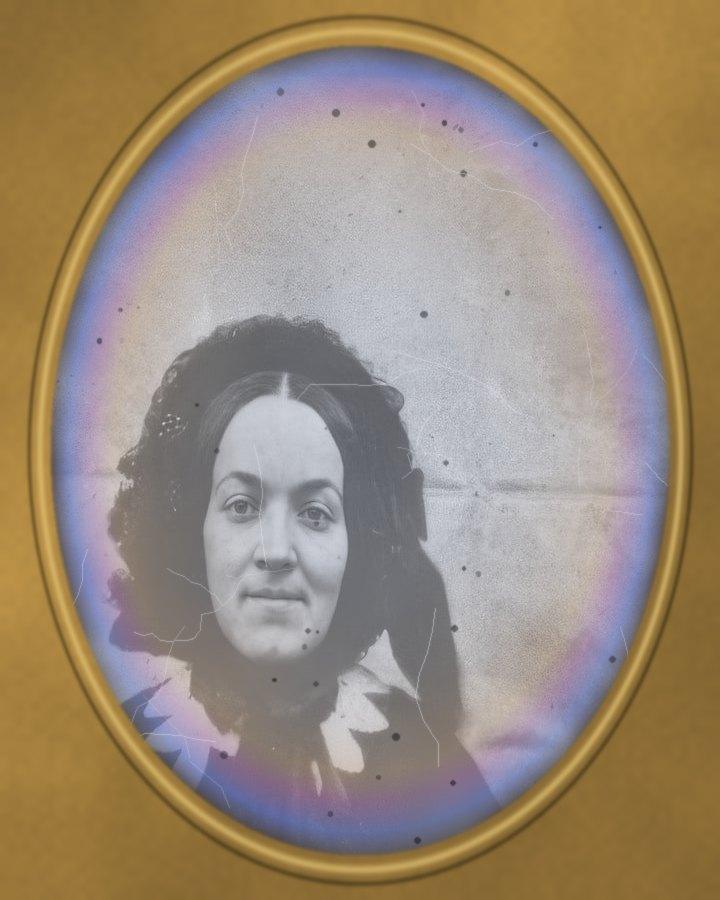
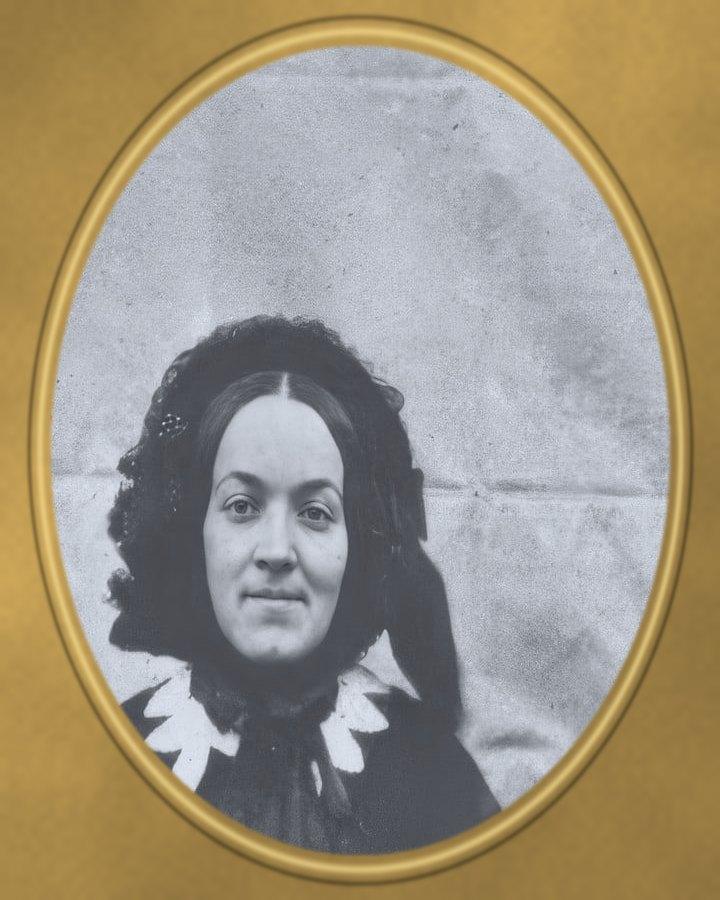
See a Tarnished Daguerreotype Before and After
Drag the handle to compare. This is an illustration, not a result: we added a daguerreotype's brass mat, then a tarnish halo, haze and spots digitally to an 1854 public-domain photo of a mother and child, so you can see what the repair aims for. With your own photo, every result is checked against your original before you see it.
Restore daguerreotype photos onlineRestore Daguerreotype Photos Online With AI
Restore Old Photos restores daguerreotype photos online with AI by reducing visible tarnish, scratches, spots, fading, and other surface marks on an uploaded capture. The restored digital copy gains image clarity and downloads at 2K, with no handling of the original plate.
- per photo
- ≈ 1 min
- per photo
- per photo
- 1 credit
- per photo
- then your upload is deleted
- 24 h
- then your upload is deleted
Daguerreotype Damage the AI Repairs on a Scan
The daguerreotype damage the AI repairs on a scan starts with tarnish halos around the plate edge, followed by wipe marks, scratches, glass spots, trapped dust, and faint image detail.
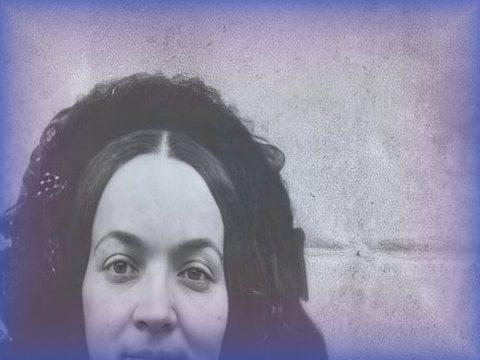
Fig. 3.1 · Illustration Tarnish Halos Around the Plate Edge
Tarnish halos around the plate edge appear as cloudy white, yellow, blue, brown, or dark bands around a daguerreotype’s edge; the discoloration is a silver tarnish of silver sulphide, silver oxide and silver chloride that can form at the edge of the brass mat opening, according to “Lingua franca – Chapter 2: Condition issues” by Library and Archives Canada, July 2025. Restore Old Photos repairs the uneven halos on the photograph with its silvering repair line, without touching the original plate.
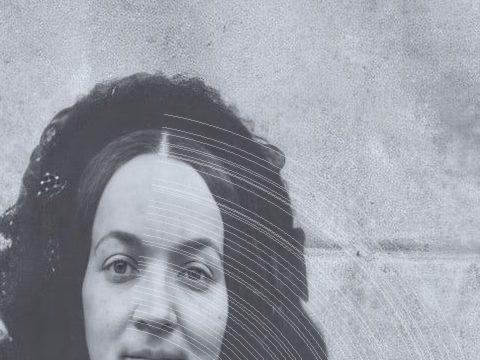
Fig. 3.2 · Illustration Wipe Marks and Fine Scratches
Wipe marks and fine scratches appear as pale or dark streaks, many of them parallel, across a daguerreotype image; plate-preparation polishing can leave such marks. On a digital capture, Restore Old Photos reduces or removes the streaks while preserving portrait details and leaving the fragile plate untouched.

Fig. 3.3 · Illustration Spots From Deteriorating Cover Glass
Spots from deteriorating cover glass appear as isolated dark marks, pale deposits, or small, drop-like crystals across a daguerreotype image. A 2018 study by Kozachuk, Sham, Martin, Nelson and Coulthard, “Exploring tarnished daguerreotypes with synchrotron light: XRF and μ-XANES analysis” in Heritage Science, found that deterioration products from the cover glass are one, but not the only, source of tarnish on the plate; AI restoration reduces the localized spots on the digital capture without altering the original.
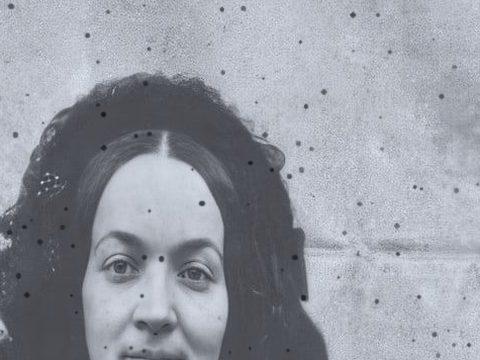
Fig. 3.4 · Illustration Dust Trapped Under the Glass
Dust trapped under a daguerreotype’s cover glass appears as small dark or light specks, irregular flecks, or hazy particles across the portrait. Restore Old Photos suppresses the dust specks in the uploaded capture while leaving the cased plate untouched.

Fig. 3.5 · Illustration Faint Low-Contrast Images
A faint, low-contrast daguerreotype image looks washed out, with facial features such as the eyes and mouth difficult to distinguish. Restore Old Photos increases tonal separation and clarifies visible detail in the digital capture without touching the original plate.
How to Restore a Daguerreotype Without Touching the Plate
To restore a daguerreotype without touching the plate, follow five steps: photograph the cased plate at an angle, upload the capture, repair damage digitally, flip the mirror-reversed image, and download the restored portrait.
Step 1 of 5
Photograph the Plate at an Angle
Photograph the daguerreotype while the plate remains sealed in its case, tilting the camera slightly off-axis until the sitter shows in full without the photographer’s reflection. Black cloth or board reduces reflections from the mirror-like plate and cover glass, and the finished capture is ready to upload for digital restoration.
Restore daguerreotype photos onlineFig. 1 · The photo you add · illustration Step 2 of 5
Upload the Capture
Upload the angled photograph of the cased daguerreotype to Restore Old Photos as a digital copy. Restore Old Photos processes the image file without opening the case or touching the plate.
Step 3 of 5
Remove Tarnish and Scratches Digitally
Restore Old Photos removes visible tarnish and scratches from the uploaded capture, using nearby image texture to reconstruct damaged areas without touching the original plate. After the digital cleanup, the restored portrait still shows the sitter mirror-reversed, which the next step corrects.
Step 4 of 5
Flip the Mirror-Reversed Image
Flip the mirror-reversed image with the horizontal flip or mirror function of an image editor, reversing the restored daguerreotype from left to right. Daguerreotype cameras produced mirror-reversed portraits, so a flipped capture shows the sitter’s features as they appeared in life.
Step 5 of 5
Download the Restored Portrait
Download the restored portrait as a 2K digital copy after reviewing the result. The downloaded image preserves the repaired daguerreotype for archiving or printing while the original plate remains untouched.
Restore daguerreotype photos online Same people · checkedFig. 5 · After (illustration)
Digital Restoration as the Safe Choice for Daguerreotypes
Digital restoration is the safe choice for daguerreotypes because the repair happens on a photograph of the image rather than on the delicate original plate.
The Original Plate Stays in Its Case
The original daguerreotype plate stays sealed in its case because touching or exposing its delicate image surface can cause damage; only the digital photograph needs repair. The unprotected surface of a daguerreotype is sensitive to the slightest touch, according to “Care of Encased Photographic Images” (CCI Notes 16/1) by Klaus B. Hendriks, revised by Joe Iraci for the Canadian Conservation Institute, 2007.
A Printable Copy of a One-of-a-Kind Image
Restore Old Photos delivers the restored daguerreotype as a 2K digital file for printing. The download gives families a printable copy of a one-of-a-kind image that has no photographic negative.
How Restore Old Photos Repairs a Daguerreotype Portrait in One Pass
Restore Old Photos repairs a daguerreotype portrait in one pass, fixing tarnish, scratches, spots, and fading in the capture with the Restore tool. Restore makes a faithful version and can add a bolder version with clearer softened details, at 1 credit each. Every result goes through a same-faces check that confirms the same sitter, with nothing added or removed, and a result that fails is remade once and otherwise refunded.
Daguerreotype Restoration Pricing
1 credit restores one photo, and a second, bolder version is 1 more. Packs start at $2.99, never renew, and their credits never expire.
Pack 01
Starter
A few favourite photos, restored and colorized.
$2.99one-time
60¢ a photo
- 5 photos restored, colorized or enhanced
- Or 1 animated clip
- Full size, no watermark
- Credits never expire
- Never renews
Most chosen
Pack 02
Family
An album's best photos, with a clip of the one you love most.
$7.99one-time
44¢ a photo
- 18 photos restored, colorized or enhanced
- Or 4 animated clips
- Full size, no watermark
- Credits never expire
- Never renews
Pack 03
Archive
For the shoebox in the attic and the family historian.
$19.99one-time
40¢ a photo
- 50 photos restored, colorized or enhanced
- Or 12 animated clips
- Full size, no watermark
- Credits never expire
- Never renews
One-time payments in US dollars. Compare credit packs and monthly plans
Daguerreotype Restoration FAQ
Can AI Restore Tintypes and Ambrotypes From the Same Era?
Yes, Restore Old Photos can digitally restore tintypes, ambrotypes, and daguerreotypes, the three principal cased photographic formats of the 19th century.
- Restoring Cased Portraits in Black and White: Restore Old Photos restores tintype, ambrotype, and daguerreotype portraits in black and white from an uploaded scan or photograph. The Restore repair removes scratches, spots, stains, fading, and blur while preserving the portrait’s grayscale appearance and period character.
Can a Restored Daguerreotype Show More Than the Plate Does Today?
Yes, a restored digital copy can reveal detail concealed by tarnish, dust, reflections, or scratches when the image information remains in the capture. AI may reconstruct plausible details where corrosion or abrasion erased information, so restoring old daguerreotype photos on a digital copy produces an interpretation, not proof of the plate’s original appearance.
Why is my daguerreotype hard to see?
Its mirror-like silver surface flips between a positive and a negative picture as you tilt it. Hold a sheet of black card or cloth so that's what the plate reflects, and the positive picture appears. Photograph it like that.
Will the people still look like themselves?
That is the one thing Restore Old Photos checks on every result. Each one gets a structure score against your original and an AI check that the same people are there, with nothing added or removed. A result that fails is remade once on a backup model; if it still fails, it's dropped and the credit comes back to you.
How Do You Identify a Daguerreotype Photo?
To identify a daguerreotype photo, look for a polished, mirror-like silver surface on a copper plate, which appears either positive or negative depending on the viewing angle, as the Grand Valley State University Art Museum notes in “Medium: Daguerreotypes.” Comparing the mirror-like silver surface with the materials used in ambrotypes and tintypes helps distinguish the three cased photograph types.
- Daguerreotype Versus Ambrotype: A daguerreotype differs from an ambrotype in its support: the daguerreotype forms a one-of-a-kind image on a polished, silver-coated copper plate, creating a reflective surface that can appear positive or negative depending on the viewing angle. An ambrotype forms an underexposed collodion image on glass; a dark backing makes the ambrotype image appear positive, and the glass surface is generally less reflective.
- Daguerreotype Versus Tintype: A daguerreotype differs from a tintype because the daguerreotype forms its image on a polished, silver-coated copper plate, while a tintype uses a dark-lacquered iron plate with a collodion binder. Daguerreotypes have a mirror-like surface; tintypes generally appear duller against their dark support.
- The 1839 Process Behind Every Plate: The 1839 daguerreotype process, announced in France, formed a direct-positive image by sensitizing a polished, silver-coated copper plate with iodine, exposing the plate in a camera, developing the image with mercury vapor, and fixing it with salt or sodium thiosulfate, as documented in “An A to Z of photographic processes” by the Victoria and Albert Museum, 2026, and in “Daguerreotype Process: 1840–1860s” by The Historic New Orleans Collection.
Should You Clean a Tarnished Daguerreotype Yourself?
No, do not clean a tarnished daguerreotype at home because wiping or applying chemicals can damage its fragile silver–mercury image surface. The National Park Service warns against touching the surface of daguerreotypes or trying to clean them in “Caring For Photographs: Special Monochrome Processes” (Conserve O Gram 14/7) by Diane Vogt-O'Connor, April 1998. Consult a trained conservator before removing a daguerreotype from its original case, as the University of Illinois Preservation Self-Assessment Program advises in “Daguerreotypes.”
- Capturing Cased Images for a Family Archive: Capturing cased images for a family archive means photographing daguerreotypes and other cased images while the cases remain closed, using even, indirect light to reduce glare on the cover glass. Support each case securely, and do not force its hinges or remove the glass.
What does Restore Old Photos do with the photos I upload?
The original is used only to make your results and is deleted from our servers within 24 hours by an hourly clean-up, or at once if you delete it. Your results stay in your account until you delete them. Before upload, your browser shrinks the photo and strips its location data.
Does Restore Old Photos use my photos to train AI?
No. Restore Old Photos never uses your photos or results to train AI models. They're sent only to the AI providers that restore and check them, whose terms allow them to use what we send only to do that job.
Does Restore Old Photos have a free trial?
No, and so there's no trial to cancel and no weekly plan. You pay per photo with a one-time pack, from $2.99 (from 40¢ a photo), and a result that fails the check never costs a credit: it's dropped and the credit comes back.
What if a result fails?
You don't pay for it. Anything that isn't delivered, including a result held back because it failed our likeness check, is refunded to your balance automatically.
More Ways to Repair Old Photos
Restore daguerreotype photos
The oldest face in the family, clear again
Restore daguerreotype photos online